BattleKnight
The Premium tab of the panel shows the status of your premium (with the expiry date), the table of what is free and what is premium and the buttons to pay.
Free and premium
Free
- Automatic missions
- Work when points run out
- Automatic re-entry from the lobby
- Telegram notifications and evening summary
- Mission place chosen by yield
- Loot chest emptied into the bag and potions at low health
- Notification of duels received and the King’s laws in the panel
- Game mail reading
Premium
- Automatic attribute training
- Better equipment bought, worn and sold by itself
- Karma power always active
- Automatic duels and Challenge
- Buying potions from the merchant, with silver only
- Target areas changed every day
- Silver runes on the items worn, mounted by the smith (option)
Without premium the options with the Premium tag are saved anyway but stay idle; the free features stay free. oBot premium has nothing to do with the game’s Premium account.
The trial
Whoever installs the bot gets a 3-day trial with everything on, without paying and without signing up.
Activate and renew
- Open the Premium tab and press Pay by card or Pay with PayPal.
- The secure oBot payment page opens with your account code already filled in: choose the package and pay. No game data, no password.
- Activation is immediate: the bot sees it within an hour, or right away if you press Check link in the Telegram tab. If you already have premium, the new period is added to what is left.
One premium per game
Free premium
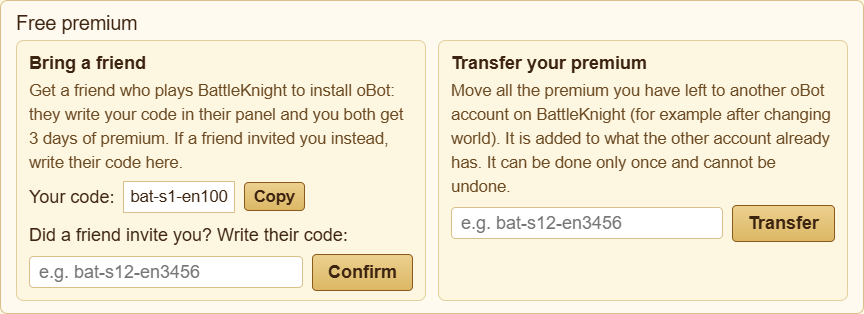
- Bring a friend: on the Premium page you find your code with Copy. The friend who installs oBot for BattleKnight writes it in their panel and you both get 3 days of premium. If a friend invited you, write their code and press Confirm.
- Transfer your premium: moves all the premium you have left to another oBot account of yours on BattleKnight (for example after changing world). It is added to what the other account already has; it can be done only once and cannot be undone.
Where you can transfer premium
Servers are split into three groups, and premium can only be transferred between servers of the same group. The group depends on the letters after the number in the server address: in s1-br it is br. In the Transfer your premium box the bot shows your server's group; if you enter the code of an account in another group, the transfer does not start and your premium stays where it is.
- Europe: it, fr, de, en, es, pt, nl, dk, fi, se, gr, si, cz, sk, pl, hu, hr, ro, jp, tw and every server not listed here
- United States: us
- Latin America, Turkey and Bosnia: br, ar, mx, tr, ba